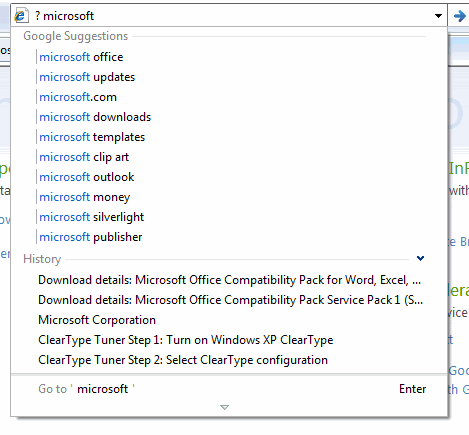
Internet Explorer 8 has many useful features that improve the way you search and browse the web. If you like to search from the address bar, you can now get suggestions from the default search engine if you prefix your query with "? ". IE8 also shows previously visited pages that match the text you typed, but it only searches titles and URLs.
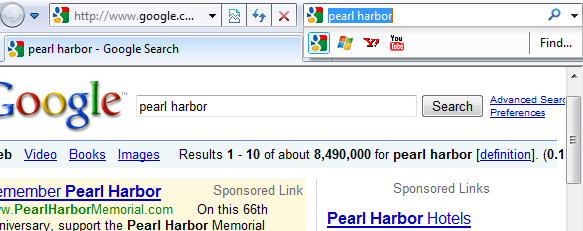
One of my favorite features is that the new version of Internet Explorer knows when you're using a search engine directly, without typing the query in IE's search box. The browser detects the query and displays in the built-in search box so you can easily find results using a different search engine.
Another interesting integration lets you find the matches of your query in a search result. After clicking on the result, go to the browser's search box and click on "Find" to see the exact matches and navigate to them.
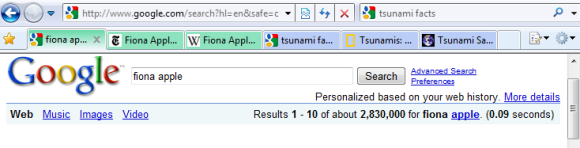
If you open search results in separate tabs, IE uses distinct colors to visually group the related tabs. Right-clicking on a tab you'll find the option to ungroup the tab and to close the entire group.
Some of the search provides that are available in IE's add-on gallery offer enhanced suggestions. For example, Wikipedia lets you navigate directly to one of its pages, Yahoo and Live Search show instant answers for weather, while Amazon includes product images.
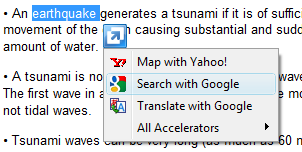
All of the search engines are accessible from the contextual menu so you can search for a text you select. They're added to the list of accelerators, which can include any web service that provides useful information about the selected text or the web page you visit: mapping addresses, translating text or bookmarking the page.
Unlike other browsers, Internet Explorer 8 encourages users to use multiple search engines and makes it easy to switch between them. Sometimes you can even obtain instant answers while you type a query or when you select an accelerator that supports previews.
Hitwise reported that Google's market share in the US was 72.11% in February. "Yahoo Search, MSN Search and Ask.com received 17.04%, 5.56% and 3.74%, respectively, and are down year-over-year at -17%, -20%, and -10% respectively." comScore has different numbers and they show that Google's market share in the US is much lower: 63.3%.
A report from the AT Internet Institute shows that Google's market share in France was 91.23% for February 2009. The major search engines that trailed Google were Yahoo (2.43%) and Live Search (2.29%).
Most of the news articles that discuss Google's market share only include the US, but it's interesting to see how popular Google is around the world. That's why I created a Google Spreadsheet where you can enter Google's market share in your country. Make sure to provide a reliable source for your information and to include recent data. The spreadsheet can be edited by anyone and it's not necessary to log in using a Google account.
Google's auto-complete feature is useful if you're not sure how to formulate your query, but it's very important how you start your search. A post from reddit compared the suggestions for queries that start with "when was" vs. "in which year was" or "why" vs. "for what reasons".
The suggestions for the formal question were fewer, more detailed and more fact-oriented. Compare "for what reason must seats in congress be reapportioned every 10 years" with "why men cheat".
In fact, most of the formal questions are copied from school assignments. As one of the reddit users noticed, "the stupid column suggests actual phrases most people will type into a Google search. The intelligent column suggests high school or college homework, mid term, finals and research questions typed verbatim as seen on the assignment."
Google has improved the way it handles questions, but it's still a better idea to reformulate your queries and replace "for what reasons" with "motivation" or "cause", "when does twilight come out on DVD" with "twilight DVD release date", "in what way did ernest rutherford contribute to our understanding of the atom and its parts" with "ernest rutherford contribution atom".
Google already rephrases some of the searches, like the examples listed below:
Whether you copy a question from a school assignment or you are really curious to find some information, type short keyword-rich queries in Google's search box.
If you're in the US and you search for "earthquake" using Google, you'll notice an OneBox that shows a list of recent earthquakes. The data is provided by the US Geological Survey.
Gmail's search lacks many useful features that are available in Google Web Search: the popular "did you mean" query suggestions, using synonyms to expand the query, searching inside PDF files or other documents, sorting the results by relevance.
It's one of the few areas that didn't evolve since Gmail's launch and I think it's embarrassing to place the "search mail" and "search the Web" buttons next to the same search box.
As you probably noticed, the web search button is now back in Gmail after a brief disappearance. A small number of vocal users complained and Google restored the button.
"You can use Gmail search the same way you'd use Google Search, by entering a word (or multiple words) that appears anywhere within the message you want to locate. If you're looking for a message that contains the word shopping, simply type shopping in the search field and press Search Mail. Your results will be displayed with your search terms highlighted in yellow. Gmail doesn't recognize special search characters like square brackets, parentheses, currency symbols, the ampersand, the pound sign, and asterisks. It also doesn't recognize partial or similar matches, so a search for travel will find travel, but not travels, traveler, or travle."
How many servers process a Google query and serve the top search results? Google Fellow Jeff Dean says that more than a thousand machines are necessary to obtain the search results in less than 200 milliseconds.
"Their performance gains are also impressive, now serving pages in under 200ms. Jeff credited the vast majority of that to their switch to holding indexes completely in memory a few years back. While that now means that a thousand machines need to handle each query rather than just a couple dozen, Jeff said it is worth it to make searchers see search results nearly instantaneously."
Google Toolbar for Internet Explorer implemented Shared Dictionary Compression over HTTP (SDCH), a technique that speeds up loading web pages. According to Google's proposal (PDF), SDCH is "an HTTP/1.1-compatible extension that supports inter-response data compression by means of a reference dictionary shared between user agent and server".
The proposal explains that "retrieving a set of HTML pages with the same header, footer, inlined JavaScript and CSS requires the retransmission of the same data multiple times. [SDCH is] a compression technique that leverages this crosspayload redundancy."
One of the sites that benefit from this extension is google.com and Google decided to add support for SDCH in Google Toolbar for Internet Explorer.
A Google help page provides a way to remove the feature by disabling the "Google Dictionary Compression sdch" add-on, corresponding to the file fastsearch.dll from Google Toolbar's main directory. There's even an example when the dictionary compression doesn't work well.
Many users report that Google started to flag all search results as malware. The problem is that Google no longer links to the search results flagged as malware and it sends users to a diagnostic page. Apparently, the bug has been fixed in about half an hour.
"This is by far the strangest thing I have ever seen on Google, but I don't know if it is happening to everyone or just me. With every search I do (as of two minutes ago), every page is marked This site may harm your computer," reported Albert Rodenius.
"Google has been acting up in extremely odd ways the last 24 hours. Right now, every single site on the web gets the message This site may harm your computer in its search result. (I never knew the Internet was that dangerous). Second, the number of server errors over the past 24 hours I've run into has been astonishing; over half my Google search queries have returned 404, long before the unsafe sites problem showed up. Now, most of the time when I click on the This site may harm your computer link, I get a server error," mentioned Greg Spira, a reader of this blog.
{ Thanks to everyone who reported the issue. Screenshot from Aris Giannakakis. }
Update: Google's blog says that "this was clearly an error, and we are very sorry for the inconvenience caused to our users. (...) Google flags search results with the message This site may harm your computer if the site is known to install malicious software in the background or otherwise surreptitiously. (...) Since each case needs to be individually researched, this list is maintained by humans, not algorithms. We periodically receive updates to that list and received one such update to release on the site this morning. Unfortunately (and here's the human error), the URL of '/' was mistakenly checked in as a value to the file and '/' expands to all URLs. Fortunately, our on-call site reliability team found the problem quickly and reverted the file. Since we push these updates in a staggered and rolling fashion, the errors began appearing between 6:27 a.m. and 6:40 a.m. and began disappearing between 7:10 and 7:25 a.m., so the duration of the problem for any particular user was approximately 40 minutes."
"Snippet = A short description of or excerpt from a website which appears in Google search results. Snippets are created automatically based on the site's content or the content of pages that link to the site." (Google Search glossary)
In some cases, Google shows longer snippets for search results if the pages provide simple answers for your query. Google previously tested a sidebar that allowed you to increase the size of the snippets and highlight extracted facts like dates and locations, but the tests probably showed that people didn't use the advanced options and that it's a better idea to automatically increase the length of a snippet if there's a high density of information related to your query.
Search Engine Roundtable suspects that "the longer your search query, the longer the snippet might get", but this is not always the case. Google tries to be smart and not overwhelm users with irrelevant information, that's why snippets are usually concise.
Here's how Larry Page described snippets in 1998, when the feature has been launched: "We recently added some new features to Google. The most significant is a summary for each result that highlights where your query matched. This makes for a much more informative summary than most search engines provide. You can actually see where your query matched without having to download each page."
Preferred Sites is a new experimental feature for Google Search that lets you personalize the results by adding a list of sites you want to appear more often when you search. Based on your search history, Google suggests some frequently-visited sites, but you can add any other site.
The help page explains more: "The preferred sites feature lets you set your Google Web Search preferences so that your search results match your unique tastes and needs. Fill in the sites you rely on the most, and results from your preferred sites will show up more often when they're relevant to your search query."
Some use cases for the feature: adding sites you trust for finding a certain kind of information (movie reviews, sports results), adding more obscure sites that aren't likely to appear in the top results (local news sites) and a partial replacement for bookmarks.
The feature is an experimental feature that can be found in Google's preferences page if you are logged in and you were selected to test it.
Here's what happens when I add GSM Arena and search for [Nokia 6080]: the result from GSM Arena is marked as "My preferred site", but there's no significant ranking change even though Google mentions that "your Preferred Sites were used to improve search results".
After adding IMDB and New York Times, the results for [how to lose friends and alienate people] were changed dramatically: two pages from nytimes.com were promoted to the top 3 results, but they weren't in the first 30 results for a regular search. Preferred Sites is an extension of Google SearchWiki, the feature that allowed you to make per-query changes. If the feature goes live to everyone, people will be able to pick a list of authoritative sites and influence all search results.
Google Cache Mapper is a Greasemonkey script that enhances Google's cached pages by adding a virtual scrollbar with all the matches of your keywords. Google highlights your search terms using different colors and this script shows the position of the matches. The virtual scrollbar is clickable and it shows snippets for each match of your search terms.
Google Chrome has a similar scrollbar that uses yellow markers to locate the matches for the "find in page" feature.
When you create a Google account, Google enables an option that saves all your queries and the results you clicked on. The service is called Web History and it can be extended to all the web pages you visit if you install Google Toolbar.
Web History has many uses, but Google has barely scratched the surface by offering some basic recommendations and trends. Google decided to personalize the suggestions offered when you type a query on Google's homepage by adding searches from your history. Like in Firefox's search box, the historical queries are displayed at the top, but the major difference is that Firefox saves the searches on your computer, while Google saves them in your account.
In the screenshot below, you can see the suggestions provided by Google after typing [gm] in the search box: there are 5 suggestions from my search history (all related to Gmail) and 5 popular queries from Google Suggest.
Google doesn't provide a way to disable the suggestions from your search history, so your options are to log out, disable query suggestions from the preferences page or delete the web history.
Update: I don't see this feature in all my accounts, so it's not available to everyone.
For navigational queries, which usually have a single relevant answer, Google experiments with adding a link to the first search result at the top of the suggestions list. Google Chrome already implements this feature and it's likely that it will be added to Google's homepage as well. Other experiments include ads and results from specialized search engines, but they don't seem to be useful.
The other two experiments continue an already obvious trend of expanding and enhancing the snippets. This time, instead of automatically detecting information from the unstructured code, Google asked some review sites to include special tags for ratings, summaries and other metadata. Yahoo has a service called SearchMonkey that encourages web sites to surface structured data using microformats and embeddable RDF.
The third experiment solves the problem of finding a long web page in the search results that includes the answer to your query in a subsection. For example, Wikipedia articles are structured in sections and subsections, each one having a permalink that uses named anchors, but Google doesn't send you directly to the right subsection. This experiment includes a link that lets you "jump" to the part of the page that includes your answer.
In a recent interview with Cedric Dupont, product manager for Google SearchWiki, we found that Google doesn't intend to provide an option to disable SearchWiki. "While users don't have the option of turning off SearchWiki, they do have the option not to use the feature. By turning off the feature entirely, people will never get used to the new offering or see how it might be useful to them. We encourage people to try it out."
Fortunately, there are some ways to hide SearchWiki's visual clutter:
1. Sign out from your Google account. The feature is only available to authenticated users since it's a way to customize search results.
3. To disable SearchWiki for the current session, add "&hl=all" to the URL of a search results page. Unfortunately, the change is not permanent. Example: http://www.google.com/search?q=test&hl=all.
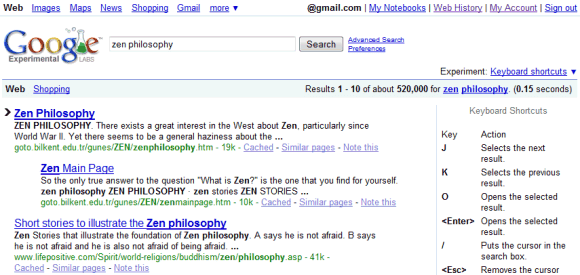
4. If you enable any Google Experimental feature except "SearchWiki with sound", you'll no longer see Google SearchWiki. Probably the most useful experiment you can enable is "Keyboard shortcuts", which adds shortcuts to Google search. Joining an experiment changes your Google cookie, so the experiment is enabled in the current browser and only until you delete Google's cookie.
SearchWiki aficionados can enable "SearchWiki with sound" to hear a sound effect when a search result is removed. "Do you enjoy having the power to remove results from your search results pages? Now you can do so in style by having a sound effect play along with the animation whenever you remove a result. Recorded by our co-founder Sergey Brin himself, this sound effect is sure to please!"
Google SearchWiki lets you customize the search results by promoting, demoting and adding new pages. You can also annotate the results. Some people think that the new feature clutters Google's clean search results, without bringing too much functionality.
Google doesn't offer a way to turn off SearchWiki other than logging out from your Google account, but you can install a Greasemonkey script that hides the interface for this additional functionality. If you use Firefox, install Greasemonkey extension, restart the browser and the add the No SearchWiki script. Google's search results will look clean again, even if you are logged in.
The script also works in Opera, which has built-in support for userscripts. Just go to Tools>Preferences>Advanced>Content>JavaScript Options, choose a folder in the "User JavaScript files" box and then save the script in that folder.
Note that the script doesn't disable the SearchWiki interface for the results you've already promoted so you can restore their default position and you can still see the removed results at the bottom of the page. To undo your changes, you can use My SearchWiki Notes page.
Update: Apparently, Google (temporarily?) removed the feature.
As anticipated last month, Google's experiment that lets you reorder and annotate search results is now live. Google SearchWiki should be available automatically if you are logged in to a Google account and it can be recognized by the visual clutter added to the search results.
Next to each result, you should see three new options: a way to promote a web page at the top of the results, an option to remove results from the page (they're still visible at the bottom of the page) and a feature that lets you share public comments about a result. After promoting a result, Google shows some unnecessary information about the other people who promoted the result.
It's important to remember that all the changes are saved to your Google account and they won't affect the search results for everyone, at least not directly. If you want to see an aggregation of all promotions, demotions and comments, go to the bottom of the page and click on "See all notes for this SearchWiki". This is the real wiki built by Google and it's easy to access by adding &swm=2 to the URL of a search results page: http://www.google.com/search?hl=en&q=google&swm=2.
Comments are not very useful, although you could find insights for some obscure queries. The absolute number of people who promoted a search result is not very useful either, especially when you'll see big numbers like 314,159,265.
SearchWiki's main idea is to give users the opportunity to manually customize the search results and make them more predictable. Since many people repeat common searches like [mail], [weather], [news] and Google's results are constantly changing, it's nice to pick your favorite results and display them at the top. If you can't find a site you like, click on "Add a result" and manually add a page in the list of top results.
Good things about SearchWiki: - you can now adjust Google's results for your typical queries and save time when repeating the searches - use Google instead of bookmarking web pages - for unfamiliar queries, check the wiki to find a different ranking and potentially useful comments. Try to avoid the wiki for queries that are likely to be spammed.
Bad things about SearchWiki: - visual clutter. The only way to remove the additional icons displayed next to each search result is to log out. - your changes are available only when you repeat the query and, in some cases, for similar queries (e.g.: [google.com] in addition to [google]). That means you can't remove a web page or a domain from all search results - comments are public and there's no option to write private notes (Google removed the option to annotate results in Google Notebook) - an obvious feature would be to get a permalink for your edited results, but Google doesn't offer this yet - there's no option to toggle between your edited results and the standard results (you'll have to log out) - it's difficult to reorder results, since the only action allowed is to place a web page at the top, after all the other promoted pages. If you promote the page again, it will become the first result.
Google has always used people's clicks to improve the quality of search results, so the new options could influence the ranking algorithms in different ways. "At this time we aren't using SearchWiki to influence ranking but it is easy to see how that could happen in the future," said Marissa Mayer. "Search is adapting to the Internet as it becomes a more participatory medium. Now you have people telling us specific things about how they'd like to see their search results. You could imagine if we do see a particular site (about which) people have a unanimous opinion, that might trigger external things. Like maybe we should check out our spam control," suggested Cedric Dupont, product manager for SearchWiki and Google Knol.
In 2002, Google Labs introduced a service that allowed you to search Google with a simple phone call. Unfortunately, the service wasn't very useful because the results were displayed on your computer and Google discontinued it.
Six years later, Google Mobile App for iPhone introduces the same feature, but this time the search results are displayed in the same application. Google built a sophisticated platform for text-to-speech and speech recognition using data from GOOG-411 and we can already some of its applications in Mobile Google Apps, YouTube and in this updated iPhone app.
It's quite weird to say how to download the app: since Apple doesn't offer user-friendly permalinks, you'll have to visit the iPhone App Store and search for "Google Mobile App". This iPhone app is just a sneak-peak into the future of mobile search, which will become more intuitive and easier to use.
"In the next 10 years, we will see radical advances in modes of search: mobile devices offering us easier search, Internet capabilities deployed in more devices, and different ways of entering and expressing your queries by voice, natural language, picture, or song, just to name a few. It's clear that while keyword-based searching is incredibly powerful, it's also incredibly limiting. These new modes will be one of the most sweeping changes in search," anticipates Marissa Mayer. She even envisions a "wearable device that does searches in the background based on the words it picks up from conversations" to illustrate how search will become a part of our life.
If you ever find an interesting academic paper in Google's search results:
...and when you click on the result, the page says that you need a subscription:
... go back and click on "All n versions", below the search snippet, to find other versions of the paper from Google Scholar. If you're lucky, you'll find the paper in the HTML, PDF or PostScript format.
Tip: to find a link to the full version of an academic paper in Google Scholar, look for the green arrow.
Google started to support Microsoft's Office Open XML formats in Gmail and web search. You can now view as HTML documents created using Microsoft Office 2007: .docx documents, .xslx spreadsheets and .pptx presentations.
Google started to index to full text of "scanned" PDF files using a technique called OCR (optical character recognition). "Every day, people all over the world post scanned documents online -- everything from official government reports to obscure academic papers. These files usually contain images of text, rather than the text themselves. But all of these documents have one thing in common: someone somewhere thought they were they were valuable enough to share with the world," says Evin Levey.
The great thing about the new feature is that you won't notice it unless you look for it, but it improves the quality of Google's search results. Google doesn't mention how many of the 300 million indexed PDF files were converted into text, but you can see some examples if you search for: [repairing aluminium wiring], [Steady success in a volatile world] and click on "View as HTML".
Google sponsors an open-source OCR software called OCRopus and it's likely that Google used it for indexing PDF files from the web. "OCRopus is a state-of-the-art document analysis and OCR system, featuring pluggable layout analysis, pluggable character recognition, statistical natural language modeling, and multi-lingual capabilities. (...) It's initially intended for high-throughput, high-volume document conversion efforts. We expect that it will also be an excellent OCR system for many other applications."