Showing posts with label Image Search. Show all posts

Friday, 20 March 2009

Find Images that Contain a Certain Color

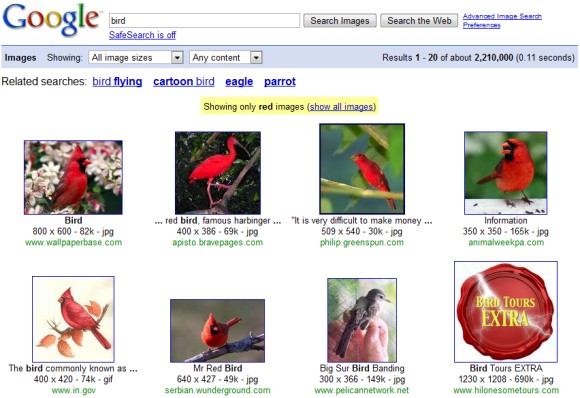
Google Image Search has a new option that lets you restrict the results based on their color. For now, the option is not available in the user interface, but you can tweak the search results URL to try it.

Searching for [red bird] shows good results, but you can still find some unrelated images. What if you search for [bird] and restrict the results to red images? Here's the URL:

http://images.google.com/images?q=bird&imgcolor=red
(you can replace "red" with "blue", "green", "teal", "purple", "yellow", "orange", "pink", "white", "gray", "black" and "brown")


You can try the new feature using this simple drop-down:

Wednesday, 11 March 2009

Optimize Web Pages for Google Image Search

Google Webmaster Central blog points to an interesting video about improving your ranking in Google Image Search.

Here are some insights:

* it's not important to get the top rankings, users often click on the next pages of results to find appropriate images. There are many "subjective" queries and users tend to explore instead of trying to find the perfect result.

* use images that are large enough.

* use high-quality images.

* include descriptive text next to the images.

* place the images so that it's not necessary to scroll too much in order to find them.

* Google Image Search clusters (almost) identical images and usually only one of them is displayed. If more than one page embeds the image, Google tries to find the most relevant page for that query.

* there are many new use cases for Image Search: inspiration, visual dictionary for foreign languages, shopping, research.

Wednesday, 28 January 2009

Find Images that Have a Certain Size

Most image search engines offers an option to filter the results by size, but you can only choose between small, medium and large images. Google Image Search has an undocumented parameter that lets you specify the exact dimension of the results:

imagesize:WIDTHxHEIGHT.

Here's an example: [imagesize:640x480 muffin] finds 640px x 480px images related to muffins.


The operator could be useful if you need to find wallpapers for your computer, logos, illustrations for a school project or any other images that have standard sizes.

{ Thanks, Michael Garmahis. }

Sunday, 18 January 2009

Text Ads in Google Image Search

After months of experimentation, Google choose to show text ads above image search results. It's not clear if the ads are actually useful for those who visit Google Image Search to find images, but Google mentioned last year that the volume of commercial queries has increased significantly.

"Whenever we make changes like these, we carefully evaluate users' reactions to ensure we're holding true to our basic principles: that ads by Google should always be relevant and useful. Of course, these experiments benefit Google because they generate revenue from new sources — but by ensuring that we show the right ads at the right time to the right people, we'll add value for users too," explained a Google blog post from November.


In 2006, Google estimated that it could earn $80-200 million a year by including text ads in Image Search. Google decided not to monetize Image Search because the experiments showed that people used the service less. I wonder if the experiments from 2008 showed different results.

It's worth mentioning that the only other important image search engine that shows ads is Ask.com Image Search.

Friday, 19 December 2008

Find Cartoons and Cliparts Using Google Image Search

Google Image Search has two new content restriction options: clip art and line drawings. Besides the two new options, you can restrict the results to faces, photos and illustrations for recent news articles.

"Many of us use Google Image Search to find imagery of people, clip art for presentations, diagrams for reports, and of course symbols and patterns for artistic inspiration. Unfortunately, searching for the perfect image can be challenging if the search results match the meaning of your query but aren't in a style that's useful to you," explains Google's blog.


You can find the restrictions in the drop-down that has the default option "any content". After ignoring the content of the images and only indexing the associated text and metadata, image search engine are transitioning to a new model that involves analyzing the images, detecting objects and recognizing patterns.

Tuesday, 2 December 2008

Find Similar Images Using Live Search

Microsoft's image search engine added another feature that uses image analysis: for each result, you can find similar images. The related images have nothing to do with are connected to the original query, so Live Search restricts the results to images similar to your selection.

"With Live Search, you can now use images, rather than additional keyword queries, to refine a search and discover more content," explains Live Search's blog.


The next obvious step would be to upload an image and find other similar images on the web. TinEye finds different versions of an image, but the scope of the results should be more encompassing.

Wednesday, 19 November 2008

Google Hosts LIFE Photo Collection

When your mission is "to organize the world's information and make it universally accessible and useful", you have to first gather the information. If it's not online, the first thing that needs to be done is to get the permission to use that data or to create a system that allows copyright owners to upload their works and to monetize them.

Google started to host content in 2001 when it acquired the Usenet archive, then it used Google Video to host movies and documentaries from the US National Archives and it digitized books from public libraries and newspaper archives.

Google Image Search's index will increase with about 10 million high-quality images from the Life Magazine's photo archive. "This collection of newly-digitized images includes photos and etchings produced and owned by LIFE dating all the way back to the 1750s. Only a very small percentage of these images have ever been published. The rest have been sitting in dusty archives in the form of negatives, slides, glass plates, etchings, and prints," explains Google.

It's interesting that Time reached an agreement with Getty Images to host the archive. "The collection contains the historic photos that LIFE published through the decades, in addition to many never-before-seen pictures of Hollywood stars, sports heroes, important people and events from the '30's though the '90's."


The photos are included in Google Image Search's index and you can restrict the results to the LIFE collection by appending source:life to your query: [apollo source:life].

Monday, 3 November 2008

Google Image Search Exposes Content Filters

Google Image Search lets you restrict the results using some content filters introduced in May 2007 directly from the standard interface. Until now, the options were available in the rarely-used advanced search page.

There are two kinds of filters:

* images from specialized search engines: news content shows images from Google News' index (news articles from the past 30 days)

* image analysis filters: Google uses face detection technology to find images that include faces and an interesting algorithm that finds photos.


I think the news content filter makes more sense as a Google News filter and it should be expanded to the entire News Archive. Microsoft's Live Search has three additional filters: illustrations, portraits, non-portraits that include faces, which are useful for some searches.

Friday, 3 October 2008

Google Tests Image Search Ads

TechCrunch reports that Google started to experiment with displaying ads next to image search results. This isn't a surprise, since Google announced in May that it intends to test display ads.

There are different formats and positions for the ads, which combine a small image with a standard text ad. Steve Poland spotted a blended ad that looked deceivingly similar to an image result.

"The big insight of Google wasn't text ads; it was that the ads should be conducive to the format. We were doing text-based search that was all textual. Visual ads don't work in that format," explained Marissa Mayer in February, when Google started to test video ads next to web search results.


Google Image Search prepares to become more useful by adding options to find similar images, recognize faces and objects. The new features will increase the site's popularity and will attract more commercial queries that could be monetized using display ads.

Tuesday, 30 September 2008

Google Photo Search

Google Image Search has a new option that allows you to restrict the results to photos: just select "Return images that contain photo content" from the advanced search page.


A simple way to find photos would be to restrict the results to JPEG files, but a search for Gmail shows that many people use the JPEG format for logos and screenshots. If we use Google's image analysis technology, we'll find more photos related to Gmail, including the Gmail soap, Gmail Theater and Gmail's product manager Keith Coleman.

The other two content restrictions available in Google Image Search are for images that contain faces and for images that illustrate recent news articles. Microsoft's image search engine has more advanced options for refining your search: you can find photos, illustrations, faces and portraits.

Sunday, 22 June 2008

Report Offensive Google Image OneBoxes

The most unpredictable Google OneBox is definitely the image OneBox. For some queries that are popular in Google Image Search, you'll three image results at the top or at the bottom of the page. In most cases, the images are relevant or at least innocuous, but if you search for Google logo one of the image results is a little bit inappropriate, as Search Engine Land noticed.


In March, Search Engine Roundtable reported an explicit image result displayed when searching for [hot celebrities]. Instead of writing a blog post to complain or sending an email to Matt Cutts, you can now report the offensive images using the small link displayed above the image results.

To disable the image OneBox, you can select "strict filtering" for SafeSearch in Google's preferences, but this also filters web pages that contain explicit text.

Friday, 23 May 2008

TinEye - Upload an Image and Find It on the Web

I've always thought that an image search engine should accept as an input images and list identical or similar images from the web. This is useful if you have an image, but you don't remember what it depicts or if you want to find a higher-quality version of an image.

TinEye tries to do that and the best part is that it mostly succeeds. The new image search engine, powered by Idée's technology and currently in private beta, has an index of 487 million images (Google's index is at least 12 times bigger) and manages to find identical versions of an image or alterations. According to the FAQ, "TinEye frequently returns image results with colour adjustments, added or removed text, crops, and slight rotations. TinEye can also detect images that are part of a collage or have been blended with another image."

And the FAQ doesn't lie: I uploaded a screenshot of Flickr's homepage that included a Flickr image in the top-left corner. TinEye returned 6 results: 5 of them were different versions of the featured image (including the original image hosted by Flickr) and another result showed Flickr's homepage with a different featured image.


Then I uploaded an image from my computer that shows fingers in a book scanned by Google and TinEye pointed to me to a TechCrunch article that included that image:


TinEye doesn't do a good job at ranking images, as it orders the images "by relevance i.e. how well the result image matches your query image". It can't figure out the most-likely original source of an image, so TinEye's algorithms could be combined with a traditional image search engine like Google's in order to determine the authority of each image. TinEye also doesn't recognizes faces or objects in an image, so it just looks for similar images.

How does it work then? "TinEye uses sophisticated pattern recognition algorithms to find your image on the web without the use of metadata or watermarks. TinEye instantly analyzes your query image to create a compact digital signature or 'fingerprint' for it. TinEye searches for your image on the web by comparing its fingerprint to the fingerprint of every single other image in the TinEye search index."

The search engine is in private beta, but you can request invite or watch this screencast:


{ Thanks, Life Tester. }

Wednesday, 21 May 2008

Future Updates for Google Image Search

At the recent "Search Factory Tour" event (slides, YouTube video), Google announced that its image search engine has received a lot of attention from users lately and it intends to dramatically improve it. People no longer use Google Image Search only to find celebrity pictures or pretty images, they started to use it to compare products, to choose vacations or visualize unfamiliar situations.


To cope with the increasing number of images from the web and to provide better answers for the new use cases, Google promised that will start to add features that use complex image analysis.


One of the new features will allow you to find similar images, given a selected image. Since it's difficult to describe pictures using words, you will be able find a a group of images that illustrate the same situation.

After adding face detection as a restriction for image search, Google prepares to expand it and actually recognize faces. This will improve the quality of results for searches that include person names. Google doesn't intend to limit image recognition to people faces: finding objects in pictures is a difficult task, but it's a reliable way to filter irrelevant pictures.

Image search engines don't use the information from EXIF tags, that could offer a lot of interesting contextual details about location, date, image quality. Google will start to add information about geolocation from digital images.


The most controversial new feature tested by Google is the addition of display ads next to image results for commercial queries. Google's previous experiments with text ads weren't very successful, so adapting the ad format to the content could be a better idea. It depends on their usefulness and their prominence: the second mock-up displayed above puts too much emphasis on the image ads. For now, Ask.com Image Search is the only important search engine for images that displays ads, but they're text-only.

If we take into account that, in addition to all these enhancements, Google developed an improved algorithm for ranking images (VisualRank), we can expect an entirely new image search engine from Google in the near future.

Monday, 28 April 2008

Improving Google Image Search Using Implicit PageRank

Image search engines have a very limited usefulness since it's difficult to accurately describe images in words and since search engines completely ignore the images, preferring to index anchor texts, file names or the text that surrounds images. "Search for apples, and they haven't actually somehow scanned the images itself to see if they contain pictures of apples," illustrates Danny Sullivan.

Image analysis didn't produce algorithms that could be used to process billions of images in a scalable way. "While progress has been made in automatic face detection in images, finding other objects such as mountains or tea pots, which are instantly recognizable to humans, has lagged," explains The New York Times.

An interesting paper [PDF] written by Yushi Jing and Google's Shumeet Baluja describes an algorithm similar to PageRank that uses the similarity between images as implicit votes. "We cast the image-ranking problem into the task of identifying authority nodes on an inferred visual similarity graph and propose an algorithm to analyze the visual link structure that can be created among a group of images. Through an iterative procedure based on the PageRank computation, a numerical weight is assigned to each image; this measures its relative importance to the other images being considered."

The paper, titled "PageRank for Product Image Search", assumes that people are more likely to go from an image to other similar images. "By treating images as web documents and their similarities as probabilistic visual hyperlinks, we estimate the likelihood of images visited by a user traversing through these visual-hyperlinks. Those with more estimated visits will be ranked higher than others." To determine the similarity between images, the paper suggests using different features depending on the type of images: local features, global features (color histogram, shape).

The system was tested on the most popular 2000 queries from Google Image Search on July 23rd, 2007, by applying the algorithm to the top 1000 results produced by Google's search engine and the results are promising: users found 83% less irrelevant images in the top 10 results, from 2.83 results in the current Google search engine to 0.47.

For example, a search for [Monet paintings] returned some of his famous paintings, but also "Monet Painting in His Garden at Argenteuil" by Renoir.


It may seem that this algorithm lacks the human element used to compute PageRank (links are actually created by people), but the two authors disagree. "First, by making the approach query dependent (by selecting the initial set of images from search engine answers), human knowledge, in terms of linking relevant images to webpages, is directly introduced into the system, since the links on the pages are used by Google for their current ranking. Second, we implicitly rely on the intelligence of crowds: the image similarity graph is generated based on the common features between images. Those images that capture the common themes from many of the other images are those that will have higher rank."

For now, this is just a research paper and it's not very clear if Google will actually use it to improve its search engine, but image search is certainly an area that will evolve dramatically in the future and will change the way we perceive search engines. Just imagine taking a picture of a dog with your mobile phone, uploading it to a search engine and instantly finding web pages that include similar pictures and information about the breed.

In 2006, Google acquired Neven Vision, a company specialized in image analysis, but the only new feature that could be connected to that acquisition is face detection in image search. Riya, another interesting company in this area, didn't manage to create a scalable system and decided to focus on a shopping search engine.