Showing posts with label Google Chrome. Show all posts

Wednesday, 18 March 2009

First Google Chrome Extensions

A design document shows an example of Google Chrome extension. For now, extensions are just fancy wrappers for user scripts, but there are plans to make them more useful by exposing browser features and allowing developers to create interfaces.

Before trying to install the extension linked at the bottom of Google's tutorial, you need to have a recent developer build or Google Chrome 2.0 beta.

To enable the support for extensions, edit the target field of the shortcut you use to launch Google Chrome. Right-click on the shortcut, select "Properties" and append to the Target field a space followed by:

--enable-extensions --load-extension="c:\myextension"

Download the extension, extract the content to c:\myextension and launch Google Chrome. The only visible effect of the extension is that it replaces the logo from Google's homepage with a lolcat, but you can edit the file foo.js and enter a different URL for the image.

Tuesday, 17 March 2009

Google Chrome 2.0 Beta

Google fixed many of the bugs from Chrome 2.0, released as a developer preview in January, and you can now try a more refined beta version. I've been using the new version since January and it's very stable. Here are some reasons why you should try it:

* Chrome 2.0 uses more recent releases of WebKit and V8, so it has a better performance. "The best thing about this new beta is speed — it's 25% faster on our V8 benchmark and 35% faster on the Sunspider benchmark than the current stable channel version and almost twice as fast when compared to our original beta version," explains the new Chrome blog.

* Full-screen. It may not mean much, since Chrome already minimizes the space used for the interface, but it's sometimes useful.

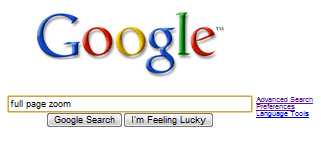
* Full-page zoom. Chrome no longer resizes just the text from a web page, so the enhanced zoom adjusts the entire page proportionally. Too bad that text zoom hasn't been preserved as an option.

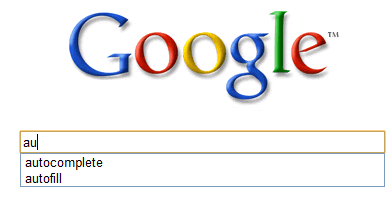
* Form autofill. The browser saves the text from input boxes and you only need to type the first letters of a previously entered text to select it. "The next time you fill out the same text boxes, Google Chrome automatically shows you what you've entered previously, if what you're typing matches what you've entered before. This text appears right below the field you're filling out. To auto-populate the text field with the saved info, simply select it with your mouse or arrows on your keyboard," mentions the help center.

* Sort the bookmarks by title. Open the bookmark manager, select a folder and click on Organize > Reorder by title.

* Scroll using the mouse wheel.

* Mouse gestures for resizing windows: you can drag a tab to various locations on the screen to place it in a docking position or to maximize it.

* Greasemonkey support, with some limitations. Not all the Greasemonkey extensions will work, there's no user interface for adding scripts, but it's a simple way to extend the limited features offered by Chrome.


The beta version has a special download page and it's the same as the version 2.0.169.1. For a complete list of release notes, check this page.

In other Chrome news, Ubuntu users can try a very early release of Chromium for Linux, a pre-alpha build that lacks basic features like tabs. I installed this version in Ubuntu Intrepid, but the web page view didn't display anything, even the browser appeared to load pages.

{ Thanks, Stefano. }

Thursday, 5 March 2009

Google Chrome, Bundled with RealPlayer

If you try to install RealPlayer, a media player available at real.com, you'll notice that the setup downloads Google Chrome. The option to install Google's browser is enabled by default and I assume that most people will not bother to disable it.


RealPlayer seems to be first third-party application used to promote Google Chrome. The browser has replaced Firefox in Google Pack and it's installed along with Google Earth if you're not paying attention.


Despite being the most aggressively promoted Google product, Chrome's market share is still low: according to Net Applications, the global market share for Chrome was 1.15% in February, compared to 0.78% in September 2008. "The biggest challenge all [browsers] face is that most people don't even know what a browser is or that there's choice," told Wired.com Brian Rakowski, director of product management at Google.

{ Thanks, Jason. }

Sunday, 1 March 2009

Standalone Offline Installer for Google Chrome

When you download the setup for Google Chrome's site, you're only downloading the installer for Google Updater. The updater downloads Google Chrome's full setup and then installs the software. Here's an excerpt from a Squid report:

12/29/2008-13:42:29 http://dl.google.com/update2/1.2.131.27/GoogleUpdateSetup.exe
12/29/2008-13:42:29 http://dl.google.com/update2/1.2.131.27/clickonce_bootstrap.exe
12/29/2008-13:42:35 http://cache.pack.google.com/chrome/install/154.36/chrome_installer.exe

But sometimes you can't install the auto-updating software or you need to perform an offline install of the software. To solve these issues, Google Chrome started to offer a standalone installer.

Google notes that "the version of Google Chrome available from the link below may not auto-update to future browser releases, meaning you could miss important security fixes and feature improvements. If you install Google Chrome using the link below, bookmark this page and check back periodically to manually download newer releases." When I installed Chrome using the offline setup, Google added the auto-updating service.

Thursday, 19 February 2009

Google Pack Comes with Shortcuts for Google Web Apps

Google Pack added a new option to install desktop shortcuts for Gmail, Google Calendar and Google Docs. The applications open in Google Chrome, in the chromeless app view. If you click on the Gmail shortcut, you have to option to register Gmail as the default mail client. Google Chrome already includes Gears, so Gmail and Google work offline if you enable the option.


Although Google calls the tool "Google Apps", the shortcuts don't work with Google Apps accounts. As a simple workaround, you can create application shortcuts using Google Chrome and use the icons installed by Google Pack.

{ via Google Docs Blog }

Friday, 13 February 2009

First Screenshot of Google Chrome for Mac

The Windows version of Google Chrome was launched in September 2008 and many users asked for Mac and Linux versions. The work to port the Windows version started soon after the initial release and it will soon show some visible results.

A document from Chromium's site includes a list of remaining features that need to be implemented. "The purpose of this document is to help organize and coordinate the effort to get a browser window up and running on Mac and Linux using as much of the code that is already there as possible (with temporary header and link scaffolding, plus ifdefs) as opposed to writing a bunch of throw-away code that duplicates what already exists on windows. Our goal is to get a double-clickable app with a working browser window using the real multi-process infrastructure (not TestShell) by mid-February."

Mike Pinkerton offers more details about the Mac port, which will certainly be released before the Linux version. "We made a list early in the week of the key classes on the critical path to getting a renderer launching and showing bits on the screen. Our goal was to have a renderer being spawned by launching the browser by the end of this week. The list is now almost all green and as of this morning we hit our goal (one day early!) to have renderer processes launched. In fact, we launch a new renderer with each tab, and when the tab is closed, the renderer goes away!! You can see it come and go in Activity Monitory. All this goes through the cross-platform infrastructure with a Cocoa front-end."

Even if there's still some work for creating a proper user interface, here's the first screenshot of Google Chrome for Mac:


And another screenshot via Mike Pinkerton: "Now mind you, clicking doesn't work, and the renderers crash like nobody's business, but the other great thing is that the user interface stays running even if they do. Just open a new tab and keep going! It's important to point out that's part of what's taken us so long to get to this point. The WebKit that ships as part of Mac OS X can't run this way -- it took a lot of work to marshall it to do so. In addition, the UI clearly needs much love, but it's an indicator of the clean and simple direction we're heading."


More about the progress of Google Chrome's Mac port:

* Mac Detailed Status: "Our new goal is to have a multi-process browser limping by the end of the quarter."

* Build instructions: "Right now, the Mac build is a work in progress. The TestShell project builds and is able to render web pages, and this area is currently under active development, but work has yet to begin on the user interface of the main Chromium application."

Thursday, 5 February 2009

Google Chrome Will Have Extensions by May

Nicholas Moline noticed an interesting session from Google I/O, a developer conference that will be held in May.

Developing extensions for Google Chrome

"Learn how Google Chrome makes it easy to write extensions using the web technologies you already know. This talk will cover the basics of the extension system (distribution/packaging, installation, updates), as well as the different APIs to enhance with the browser."

We can assume that Google Chrome will add support for extensions before May 27th, when the conference starts.

A recently published document explains the process model for extensions. The latest developer versions of Google Chrome already supports user scripts, which could later become part of more complex extensions.

"Chromium extensions will follow a multi-process architecture to share the same kind of stability and security that regular web pages have in Chromium. All of an extension's code runs in a single process, separate from the browser (with the exception of user scripts which run in whichever renderers they apply to). Extension code can communicate with user scripts, and vice versa, through a message passing API."

There's also a list of APIs that includes support for changing the theme, customizing toolstrips and buttons, manipulating the download system, interacting with the history and bookmark system, adding support for sidebars and status bars.

{ "Chrome Drip" licensed as Creative Commons by ViaMoi. }

Thursday, 29 January 2009

Chrome Ad from Google Japan

Google Japan created a small ad for Chrome, the browser that moves fast, evolves rapidly and loads pages quickly.


An example of quick patch is that the latest Chrome version spoofed Safari's user-agent to make Hotmail work properly. "Normally you think of web pages being faster to update than client-side software downloads. In this case though, Chrome updates near-weekly, much faster than Hotmail did. Another illustration that velocity and speed of iteration matter," commented Google's anti-spam guy. And probably another example that web developers ignore browsers with small market share.

Update: Check out the behind the scenes photos.

Thursday, 8 January 2009

Google Chrome 2.0 Pre-Beta

Google Chrome's development is high-paced and version numbers are not very significant, but it's weird to see a pre-beta release of Chrome 2.0, four months after Chrome 0.2. There are many new things in Chrome 2.0:

* form autocomplete, one of the most obvious missing features from the initial release


* full-page zoom, which resizes images and embedded objects too, not just text. It's important to know the keyboard shortcuts: Ctrl - to zoom out, Ctrl + to zoom in and Ctrl 0 to go back to the normal view.


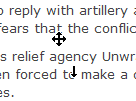
* autoscroll by middle-clicking on a page and indicating the direction


* profiles are a great way to separate Chrome's settings in different categories: you could create a work profile with its own homepage, bookmarks and browsing history and profile for your personal projects. The great thing about Chrome is that you don't have to close the browser to change your profile: just open a new window in a separate profile.


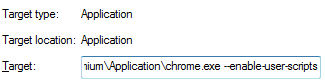
* support for Greasemonkey scripts (or user-scripts). To enable this experimental feature you need to right-click on Chrome's shortcut from your desktop, select Properties and add -enable-user-scripts in the Target field. For now, you'll need to place the scripts in c:\scripts, but the location will change in the next builds.


* other important improvements: updates to WebKit and the V8 JavaScript engine, a better implementation for SafeBrowsing (malware/phishing protection), new code for the HTTP network protocol.

How to get the new version?

1. If you don't have Google Chrome, install it from google.com/chrome
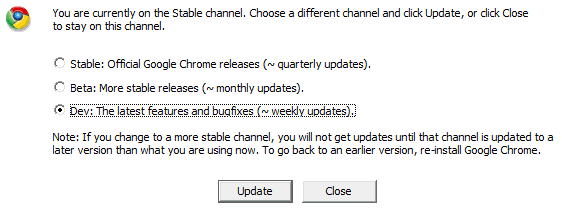
2. Subscribe to the developer preview channel. This is required even if you've previously subscribed to the channel.
3. Wait until the new version is downloaded (you may force the update by opening the "About Google Chrome" dialog).


"The Dev channel is where ideas get tested (and sometimes fail). The Dev channel can be very unstable at times, and new features usually require some manual configuration to be enabled. Still, simply using Dev channel releases is an easy (practically zero-effort) way for anyone to help improve Google Chrome."

If you don't like the new version, you can always downgrade to the most recent stable version by reinstalling Chrome.

Thursday, 18 December 2008

Chrome Undone


No, this is not a new version of Google's homepage, it's just a summary of the most aggressive promotion for a Google product. Now that it's out of beta, Google Chrome can be added to any software bundle, can be a part of any distribution deal and any promotion.

If Sun offers the option to install an entire office suite when you update JRE, why shouldn't Google use a popular software like Google Earth to drive adoption to Chrome? When you try to download Google Earth from Windows XP or Windows Vista, Google shows this completely unrelated page:


Google clearly displays that it will also install Chrome and users have the option to exclude Google Chrome, but Google assumes that most people will just click on "Agree and download" without reading the content of the page. Before bundling Chrome with Google Earth, Google used a trick to install the toolbar:


Microsoft's desperate attempts to promote Silverlight made the company to show an annoying invitation to "enhance your experience on Microsoft.com with Microsoft Silverlight" whenever you visit microsoft.com. There are many ways to annoy your users, but does it really worth it?

{ via Blogoscoped }

Friday, 12 December 2008

Google Chrome, the Default Browser in Google Pack

Now that it's no longer in beta, Google Chrome has been added to Google Pack. Firefox bundled with Google Toolbar is still available, but you need to explicitly select it. Adding Chrome to Google Pack means that existing users will be informed about the new software and the new users will install Chrome instead of Firefox.

Google contributed significantly to Firefox's popularity by promoting it on the homepage, including the browser in a software bundle and encouraging publishers to promote Firefox. Google's official alternative to Internet Explorer is now Chrome.

Thursday, 11 December 2008

Google Chrome 1.0 Released

"We've heard a lot of feedback about product bugs and feature requests and have worked hard to prioritize work on them. We're excited to announce that with today's fifteenth release we are taking off the "beta" label," explains a post from Google Chrome Help Announcement blog. Ironically, the post doesn't look very well in Chrome.

There aren't many differences between the first release of Google Chrome and the version released today: besides fixing bugs and improving the support for plug-ins, Chrome added a bookmarks manager. The browser still lacks many basic features and customization options: previewing feeds, print preview, customizable "new tab" page, form autocomplete (this feature will be added soon) and there are many issues that should have been fixed before even considering to remove the "beta" label.

Google Chrome is not out of beta because it's ready, but because Google wants to sign some deals with computer manufacturers like Dell that will preinstall the browser. " The Google's open source browser has a number of eager customers, including OEMs who can't offer the browser until it is in full release," mentions TechCrunch. Even German's Federal Office for Information Security said that Google's browser is not for general use because it's still in beta. If that's price to increase the adoption, then Google didn't have to do much: just pretend that Chrome is ready for prime-time.


"We have removed the beta label as our goals for stability and performance have been met but our work is far from done. We are working to add some common browser features such as form autofill and RSS support in the near future. We are also developing an extensions platform along with support for Mac and Linux," reminds us Google's blog.

It's clear that Google targets Internet Explorer's users and it will need to use an aggressive campaign to promote the browser and to succeed where Mozilla couldn't. But even if IE is slower and less secure than Chrome, it certainly has less glaring bugs than Chrome (open Google Book Search, click on a book, read 5-6 pages and then try to use the back button).

Saturday, 6 December 2008

Toolbar, Gears, Chrome

Launched in December 2000, Google Toolbar started as a way to add features that were missing from Internet Explorer. Users had to visit Google's homepage to perform a search and the toolbar improved the experience by adding a search box to the browser. In the next versions, the toolbar added query suggestions, a pop-up blocker, a spell checker and other features that later became part of most modern browsers.

In May 2007, Google launched a plug-in that made browsers more powerful by integrating advanced features like offline storage, local database, location services. Google Gears added invisible features that allowed web applications to become more responsive and to work even offline.

The trouble with Google Toolbar and Gears was that users had to install them separately, the browser integration wasn't very smooth and there were many other things that could improve web browsing, but can't be added using a plug-in. A better JavaScript engine, a more reliable browser that crashed less, a fast and simple interface - it's hard to make all these things happen without building a new browser. If Google Toolbar made it easier to search using Google, Chrome encourages to use the web more because the browser loads instantly, you can find web pages faster and you spend less time waiting for pages to load.

A press release from 2000 explained that "Google exists to provide the world's best Internet search experience. Google accomplishes this for millions of users daily by delivering a powerful, fast, and easy way to find the most relevant information available." Google changed the scope of the mission from improving the way you search the web to improving the way you experience the web. A better browser, along with a faster Internet connection, great web applications and an open environment that encourages innovation bring more Internet users and, as a consequence, more Google users.

Tuesday, 2 December 2008

On Google Chrome's Future Support for Extensions

When Google Chrome was launched, many people wondered why there's no support for Google Toolbar or for extensions that are available for Firefox. After fixing the glaring bugs reported by users, improving bookmark management, adding autocomplete and starting to work on Mac and Linux versions, the next step is to open the browser to developers.

Google published a document that details how extensions will work in Google Chrome. "Chromium can't be everything to all people. People use web browsers in a variety of environments and for a wide variety of jobs. Personal tastes and needs vary widely from one user to the next. The feature needs of one person often conflict directly with those of another. Further, one of the design goals of Chromium is to have a minimal light-weight user interface, which itself conflicts with adding lots of features."

The extension development should be similar to developing web pages, the browser should include support for silent autoupdate, extensions should not be able to crash the browser process and they should be run in sandboxed processes. An interesting side-effect would be that you won't have to restart the browser after installing an extension, like in Firefox.

Google lists some extensions that should work in Chrome: bookmarking tools like a toolbar for Delicious, content filtering extensions like Adblock (sic!), download managers like DownThemAll and other popular extensions that are available for Firefox.

"We should start by building the infrastructure for an extension system that can support different types of extensibility. The system should be able to support an open-ended list of APIs over time, such as toolbars, sidebars, content scripts (for Greasemonkey-like functionality), and content filtering (for parental filters, malware filters, or adblock-like functionality). Some APIs will require privileges that must be granted, such as access to the history database or access to mail.google.com."

In the end, we should see an extension gallery hosted by Google that will initially include a list of popular Firefox extensions. Chrome won't support XUL, so the extensions aren't going to be ported automatically. The latest Chromium buils already include an initial Greasemonkey implementation, so there's one less extension to build.

{ via Webware }

Saturday, 8 November 2008

Google Chrome to Improve Bookmark Management

Some recent Chromium builds added many features that improve bookmark management and they'll probably be available in a future Google Chrome update (to find the difference between Chrome and Chromium, read this post).

The most notable new feature is a bookmark manager that lets you find bookmarks, move them to a new folder or easily delete a large number of bookmarks. In the Tools drop-down, there are options to import bookmarks from a HTML file and to export bookmarks in a similar format.


Another useful new feature is the option to import bookmarks from Google Bookmarks. The browser incorrectly mentions that the bookmarks are imported from Google Toolbar, since the toolbar doesn't even have to be installed. For now, the bookmarks aren't synchronized with Google Bookmarks.

Saturday, 1 November 2008

How Google Promotes Chrome

Is Chrome the most heavily promoted Google product? Like for many other products, Google "buys" AdWords ads to promote Chrome, but there are many other places where you can find Chrome ads.


When it was launched, Google placed a link on the homepage which stayed there for a week. At the same time, Chrome gained a prominent placement on Google Japan's homepage, next to services like YouTube or Gmail:


Andreas spotted an ad for Google Chrome in Taipei (Creative Commons-licensed image):


Starting from today, YouTube promotes Chrome on the homepage and the bottom of every page:


The promotion is similar to the last month's ad from orkut (screenshot licensed as Creative Commons):


If you download Chrome from one of these sites, Google will append a RLZ parameter to each Google search URL. "RLZ contains some encoded information, such as where you downloaded Google Chrome and where you got it from. This parameter does not uniquely identify you, nor is it used to target advertising. This information is used to understand the effectiveness of different distribution mechanisms, such as downloads directly from Google vs. other distribution channels," explains Chromium Blog.

It's unclear whether Google "will do well to expand its business", but Chrome seems to be a part of a strategic initiative to make Google more visible on the desktop, a mix between Google Toolbar, Google Desktop and Gears that turned into a browser and that needs a critical mass to be taken seriously.

{ Thanks, Sterling. }

Friday, 17 October 2008

Google Chrome to Add Greasemonkey Support

A recent build of Chromium, the open source project behind Google Chrome, added support for user scripts. For now, the support is limited: Chromium reads the scripts from the hard-coded directory c:\scripts and it ignores the @include metadata which restricts scripts to one or more web addresses. To enable Greasemonkey support, you need to use the flag: --enable-greasemonkey, for example by appending it to the target of a shortcut.

I tested the Greasemonkey support with the old script Linkifier, which turns text URLs and email addresses into links.


The new feature has been contributed by Aaron Boodman, the creator of the Greasemonkey extension for Firefox, who happens to work at Google.

In September, Google's Sundar Pichai said that Chrome will have an API for extensions. "We don't have that in the beta today, but we definitely plan an extension API. It is one of the things we will get to next." It seems that Google Chrome will provide native support for Greasemonkey scripts before releasing the API.

Tips:
* to get early access to developer-oriented Google Chrome builds, subscribe to the Dev Channel and read the release notes.
* the latest Chromium snapshots are available at the BuildBot site, but they don't support Google's auto-updater and they're less stable than the official releases. You only need to download the file chrome-win32.zip from the most recent folder.

Sunday, 14 September 2008

Google Chrome, a Shell for the Web

"In the long term, we think of Chromium as a tabbed window manager or shell for the web rather than a browser application. We avoid putting things into our UI in the same way you would hope that Apple and Microsoft would avoid putting things into the standard window frames of applications on their operating systems. The tab is our equivalent of a desktop application's title bar; the frame containing the tabs is a convenient mechanism for managing groups of those applications. In future, there may be other tab types that do not host the normal browser toolbar," explains a document about Chrome's user experience.

This philosophical shift might explain why there are few interface distractions and the browser is barely visible. Google Chrome is built for web applications that have their own menus, keyword shortcuts and status bars.


Chrome comes with intelligent defaults to minimize the interaction with the browser. The settings dialog doesn't include many options available in other browsers and the team hopes to "reduce the number of options further". The lack of customization is not a good news for advanced users, but normal users might appreciate the simplicity of the interface.

"The heck with more features, is Safari 3 faster, more stable, less memory-hungry and more compatible on the web at large? That's what I want to see in each release," commented Peter Kasting on an article from 2006 about Safari 3. Peter Kasting is now an engineer in the Google Chrome team.

Monday, 8 September 2008

Use Multiple Google Accounts Simultaneously in Google Chrome

Google Chrome's incognito mode is less sophisticated than IE8's InPrivate browsing, but it has a feature that will be useful for those who have more than one Google account.

When you open a window in incognito mode (Ctrl+Shift+N), your cookies from the standard session are no longer available and you can easily log in to a new Google account.


Chrome's help center has more details about this feature. "Webpages that you open and files downloaded while you are incognito won't be logged in your browsing and download histories; all new cookies are deleted after you close the incognito window. You can browse normally and in incognito mode at the same time by using separate windows." Michael Jeffrey explains that "incognito mode is a window-level mode - all pages viewed within this window are not persisted to the user's history, and incognito pages use a temporary cookie store that is blank at the start of the incognito session".

When you close the incognito window, all the cookies are deleted so you need to log in again the next time you browse in incognito mode. This trick can be used for any other services that allow multiple accounts, but you can only use two accounts at the same time: one in a standard window and the other one in incognito mode.

Thursday, 4 September 2008

Google Analytics Tracks Chrome

TechCrunch reports that Google Analytics included Chrome in the list of detected browsers. It's probably irrelevant that 8.64% of today's visits for this blog were from Google Chrome because a lot of users test the new browser to see if it's better than IE, Firefox, Safari or Opera.

(Find the report in : Visitors > Browser Capabilities > Browsers)

Two days ago, Google Analytics Blog admitted that the web analytics service intentionally concealed the identity of the new browser. "Because Google Chrome was not launched externally until today, we haven't yet changed Google Analytics to recognize it when you segment by browser within reports. However - this will change in the coming weeks (until then, the browser will show as Firefox)." The blog post has been edited and it no longer contains the reference to Firefox, but I can't help wondering if Google Analytics hides other things.

If you want to detect Google Chrome, this user-agent should be helpful:

Mozilla/5.0 (Windows; U; Windows NT 6.0; en-US) AppleWebKit/XX (KHTML, like Gecko) Chrome/YY Safari/XX

For now, most services don't detect Chrome, probably because Safari has a very similar user-agent:

Mozilla/5.0 (Windows; U; Windows NT 6.0; en-US) AppleWebKit/XX (KHTML, like Gecko) Version/ZZ Safari/YY