Showing posts with label Google Video. Show all posts

Tuesday, 10 March 2009

Google Video Upload, Powered by Gears

Google Video started to diminish the importance of the uploading feature by placing the "upload" link at the bottom of the homepage. What's surprising is that uploading videos to Google Video now requires Google Gears so you can upload huge files simultaneously (up to 1 GB) and see the progress.


In January, Google announced that it will discontinue support for uploads to Google Video in a few months. "We've always maintained that Google Video's strength is in the search technology that makes it possible for people to search videos from across the web, regardless of where they may be hosted. And this move will enable us to focus on developing these technologies further to the benefit of searchers worldwide."

Even though Google owns YouTube, a much more popular video hosting service, Google Video attracts a different audience that watches longer videos and doesn't like the extraneous social features from services like YouTube. Google could use the same back-end for both services and promote Google Video as the place where you can watch Charlie Rose's interviews, interviews from the archive of American Television or public domain movies.

Friday, 20 February 2009

Google Video, Back in Google's Main Navigation

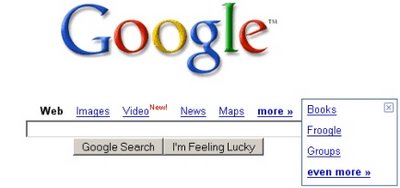
Google Video replaced Product Search in Google's main navigation, now that Google's comparison shopping site started to become popular.

Google Video first replaced Froogle on the homepage in 2006, two months before Google acquired YouTube.


A year later, Froogle replaced Google Video on the homepage and it was rebranded as Google Product Search.


And now Google Video is back on Google's main navigation, while Froogle is available in the "more" drop-down.

Monday, 10 November 2008

Filter File Types from Google Video's Results

Google Video added a new option to the advanced search page: you can now filter videos that weren't uploaded to video sharing sites. If the search results include many videos that have one of these formats: ASF, AVI, FLV, M4V, MPV, MP4, MPG or WMV, you can exclude them by unchecking the corresponding box.

Unfortunately, Google Video doesn't provide an option to restrict the results to one or more of these formats, like you can do at Yahoo Video Search.

Saturday, 11 October 2008

No More Annoying Frames in Google Video

Google has finally made the right decision and it removed that were created when you clicked on a result from Google Video. Instead of directly linking to the original site, Google used frames to show both the external site and a list of related videos from Google Video. This duplicated the functionality from video sites like YouTube, while making it difficult to navigate and to share a URL.

Here's the first version of the frame, from June 2007:


... and a screenshot from April 2008, when Google Video has been redesigned:


Google Image Search uses a similar frame, but it's more useful as it provides information about search results. If you don't like the frame from Google Image Search, you can use Greasemonkey scripts like Google Image Relinker or Google Image direct links to bypass it.

Monday, 8 September 2008

Google Video Suggest

Google Video started to display suggestions in the search box. The suggestions are identical to the ones used for YouTube probably because Google has a single platform for searching videos which is used by both YouTube and Google Video.

The number of suggestions is 5 and they can be disabled in the preferences page by selecting "Do not provide query suggestions in the search box".


So why use Google Video instead of finding videos on YouTube? Google Video indexes videos from hundreds of sites, many of the videos can be played without opening a new page and you can share them with your Gmail contacts.

Saturday, 9 August 2008

Restrict Google Video Results to Embeddable Videos

Google Video has a new option: restrict the search results to videos that can be embedded in a web page. This is especially useful for the TV view that plays videos without opening new pages. Google shows a small "play" icon next to the videos that are playable inline.


In other related news, Google Video tests an autocomplete feature that shows popular queries from YouTube [sic]. As previously reported, YouTube Suggest has been launched in May after more than a month of public testing.


Monday, 14 July 2008

Google Demoes Video Search with Speech Recognition

Google released a demo for a speech-to-text technology that allows you to search inside a video's content. You can add an iGoogle gadget that is restricted to a small number of political videos from YouTube. Since the gadget is actually an iframe, you can also go to the original page.

"Using the gadget you can search not only the titles and descriptions of the videos, but also their spoken content. Additionally, since speech recognition tells us exactly when words are spoken in the video, you can jump right to the most relevant parts of the videos you find," explains Google.


EveryZing uses speech-to-text technology to search for audio and video across the web. The site has a separate section for YouTube videos, but the coverage is unimpressive.

Monday, 26 May 2008

Google Video's Player Detached from Search Results

The default view for Google Video, TV view, has been updated and you can now search for videos without interrupting the video that is already playing. You can go to the next page of results or reformulate your query, while still watching a video.

You'll also notice that Google Video can play videos inline not only from Google's sites, but from many other popular video sites (some notable exceptions: AOL Video, MySpace, Yahoo Video).


Google Video started by close-captioning TV shows, then moved to hosting videos, searching videos on the web and now the natural evolution is to come full circle back to close-captioning videos. Maybe in the future Google Video will bring back playlists and we'll be able to watch a selection of videos, like in YouTube Fast Search.

Monday, 28 April 2008

Google Video Categories

The latest Google Video redesign removed yet another useful feature from the interface: restricting search results to a certain category. The feature is still available, but you need to use the genre: operator in your searches. Here are some of the most popular genres:

genre:animation
genre:comedy
genre:documentary
genre:educational
genre:gaming
genre:movie_feature
genre:music
genre:sports
genre:tv_show

Examples of searches:
ufo genre:documentary
charlie chaplin genre:movie_feature
data mining genre:educational

You can also use the genre: operator to better describe your search when you want to subscribe to a Google Video feed or to get an email alert when new videos are uploaded.


At some point in Google Video's history, you could browse videos by genre directly from the homepage, but you can still use the genre: operator without any other keyword to see popular videos from a certain category, like TV shows.

Friday, 18 April 2008

Yet Another Google Video Redesign

Google Video redesigned its homepage and now only includes a list of "hot" videos. "The Google Video home page allows you to browse and play hot videos directly from the home page, making it easier for you to discover popular, interesting videos from across the web. The hot video list is compiled by looking at a variety of signals including videos that most shared, viewed and blogged about."

The video watch page has also been redesigned and it's more flexible: you can hide the right sidebar, minimize the list of related videos and use pagination to read a long list of comments.


Videos from third-party online video sites are still displayed in an annoying frame, but Google Video's bar has been moved at the left of the page to leave more room for the videos.


The search page has two new options for displaying results: in a grid and in TV view, that lets you watch videos while also being able to see the list of results. An interesting new option in the advanced search page lets you search only closed captioned videos. Another good thing is that you can now watch videos inline for some new video sites: DailyMotion, Revver, Guba, Crackle, not just for YouTube and Google Video.


The updates make Google Video more user-friendly and easier to use, even if mixing a video search engine with a video hosting site makes the user experience confusing.

Wednesday, 16 April 2008

An Outdoor Campaign for Google Video

This very interesting outdoor campaign for Google Video Germany used a billboard imitating a real-life video player that captures the life as it happens. The tagline is "any film you can imagine", a simple message that encourages people to search for videos and to upload their own videos. AdFreak has an interesting explanation for the unusual idea: the see-through billboards suggest "that online video presents life in all its glorious randomness".

It's not very clear if the campaign was launched before or after the YouTube acquisition, but the fact that the video embedded below is from YouTube tells a lot about Google Video's success.