Showing posts with label Google Notebook. Show all posts

Thursday, 21 August 2008

Export Google Notebooks

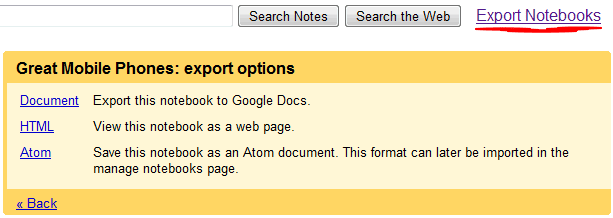
Google Notebook provides options to export each notebook as HTML or in the Atom format, but it's not very easy to export all your data. A Greasemonkey script automates the tedious work by reformatting the mobile page and adding links to the HTML or Atom version of each notebook.

The default format is Atom and you should use it if you want to edit the notebooks on your computer and then import the files to Google Notebook. It's a good idea to use the HTML format for archiving your notebooks.

This script requires Firefox, Greasemonkey extension and a download manager like DownThemAll that saves all the files linked from a page or some of them.


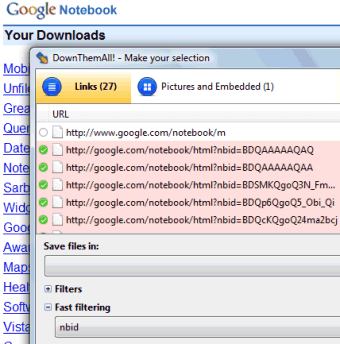
After clicking on "Export notebooks", right-click and select "DownThemAll!". Choose a folder where to save the files, type nbid in the "Fast filtering" box and click on "Start".


Peter Shafer wrote a similar script for exporting Google Docs documents.

Friday, 11 July 2008

Google Notebook Bookmarklet

There are many ways to add notes to Google Notebook: you can visit google.com/notebook or click on "My notebooks" from any Google search results page. To add excerpts from web pages, you need an extension: Google Toolbar 5 for IE or Google Notebook for Firefox. But what happens if you use a browser like Safari or if you aren't allowed to install add-ons?

Google Notebook bookmarklet is a lightweight alternative that doesn't require installation. You just drag and drop a link to your browser's links bar or bookmark the link. To copy some content from a web page to a notebook, just select the text and click on "Note this".


For some reason, Opera can only view notebooks, so this bookmarklet can't be used to add notes.

Related:
Useful Google bookmarklets

{ via Google Notebook Blog }

Friday, 11 April 2008

Google Notebook Exposes More Exporting Options

Google Notebook updated the editing toolbar and to make it look more consistent with Google Docs. There are also new exporting options:

* you can export to HTML any notebook, not just public notebooks

* notebooks that include addresses can be visualized on a map and converted into a personalized map

* public notebooks already had feeds, but it's much easier to subscribe to the feeds by clicking on "export as RSS" in the Tools menu (ironically, Google uses the Atom format). This should be useful to track the changes in collaborative notebooks.


Google Notebook integrates with a lot of Google services: you can find a "Note this" option next to Google's search results, there's an option to import some text from public domain books in Google Book Search, Google Bookmarks are added to a special notebook, you can export a notebook into Google Docs to create a document or to save it as PDF, the latest version of Google Toolbar for IE integrates with Notebook, there's an iGoogle gadget and a cool integration with Blogger thanks to the hAtom microformat. Google Notebook is actually a web clipboard, a bridge between web applications and I expect to see options to identify structured content, bookmark videos, events, contact details, code snippets and more.

{ Thanks, AniMatrix. }